The verified
AI agent for
Unreal Engine.
Kismet edits Blueprints, Animation Blueprints, Materials, UMG, and project assets inside the editor, then checks the result with compiler feedback, rollback-safe mutations, and real-editor evals. Built for professionals shipping real games.
- Beta access
- Managed usage plans coming soon
- UE 5.6, 5.7, and 5.8
Verified, not guessed
Every change is checked. Twice.
Before it edits
Plan mode explores your project read-only and presents an implementation plan for approval before touching a graph. Reference analysis shows what depends on an asset before a breaking change.
At every edit
Every Blueprint edit is compiled before it's reported as done. Errors loop back into the agent until the change is correct. No silent failures, no edits that look right but break on save.
When an edit fails
Batched edits support atomic rollback: when one operation fails, the whole batch is undone and the graph is left exactly as it was. No half-wired graphs.
Before shipping
AI tools regress silently — a model update or a prompt tweak can quietly break a workflow that worked yesterday. Every Kismet release is gated on 134 real-editor scenarios, graded by code-level assertions on the resulting graph state — not by AI judgment. Quality is a measured number, not a feeling.
Measured, not vibes
Every release runs through real Unreal Editor scenarios.
Kismet is scored by Unreal snapshots and compiler results, not by an AI judge. The suite checks what changed, what compiled, what stayed untouched, and whether the agent recovered from the kinds of mistakes that break real projects.
Build faster
Build faster.
Spec the system; Kismet does the mechanical work. It places nodes with correct types, wires exec and data flow, and keeps the graph readable as the design evolves.
- Place nodes. Drop in functions, branches, custom events with the right types and pins.
- Wire graphs. Connect exec flow and data pins across nodes, functions, and macros.
- Tame legacy graphs. Untangle inherited Blueprint spaghetti — rename, re-route, and restructure without changing behavior.
Understand faster
Find what's broken. Learn what's there.
Kismet reads your project, your plugins, and the engine source. Trace a bug across Blueprints and C++. Ask how a feature works. Get answers with file and line references.
- Trace bugs. Follow a misfiring event through Blueprints and into native C++ — across modules and plugins.
- Read engine source. Ask how a class actually fires or what an internal API guards. Cited with file and line.
- Inspect classes. Get the Blueprint-visible properties and callable functions of any class with pin-compatible types.
Full coverage
One agent across the whole editor.
Real features cut across systems. Kismet works in every one of them — in the same conversation.
Blueprints
Event graphs, functions, macros. Variables, dispatchers, interfaces, parent class changes — structural edits, not just nodes.
Animation
Anim Blueprints and state machines — states, transitions, blend rules. Montages, blend spaces, and notifies on the assets themselves.
Materials
Author material graphs, create instances, override parameters. Shader instruction counts reported on every compile.
UMG
Read and edit Widget Blueprint designer trees, then wire widget events into the graph.
Components
Add, reparent, and configure components — defaults, collision, materials — including ones inherited from C++ parents.
Project & assets
Asset registry search, reference analysis before breaking changes, asset lifecycle, and live editor log access.
Niagara, C++ editing, and Behavior Trees are on the way. See the roadmap →
Built for the engine
MCP exposes tools. Kismet verifies outcomes.
Generic agents can call Unreal APIs. Kismet is built around the harder part: deciding which operation is safe, checking the resulting editor state, compiling the asset, and rolling back failed batches.
A generic agent + MCP wrapper
- Exposes editor calls and leaves the model to choose correctly.
- "Success" means the call returned.
- Untested — quality is anecdotal.
- Lives in a separate IDE or chat client.
Kismet
- Chooses Unreal-specific workflows with pin types, pose spaces, material rules, and asset references built in.
- Success means the resulting asset was checked by Unreal snapshots and compiler feedback.
- Every release is gated on 134 real-editor scenarios with code-level assertions.
- Native plugin, in-process, next to your graph.
In your editor
Lives next to your graph.
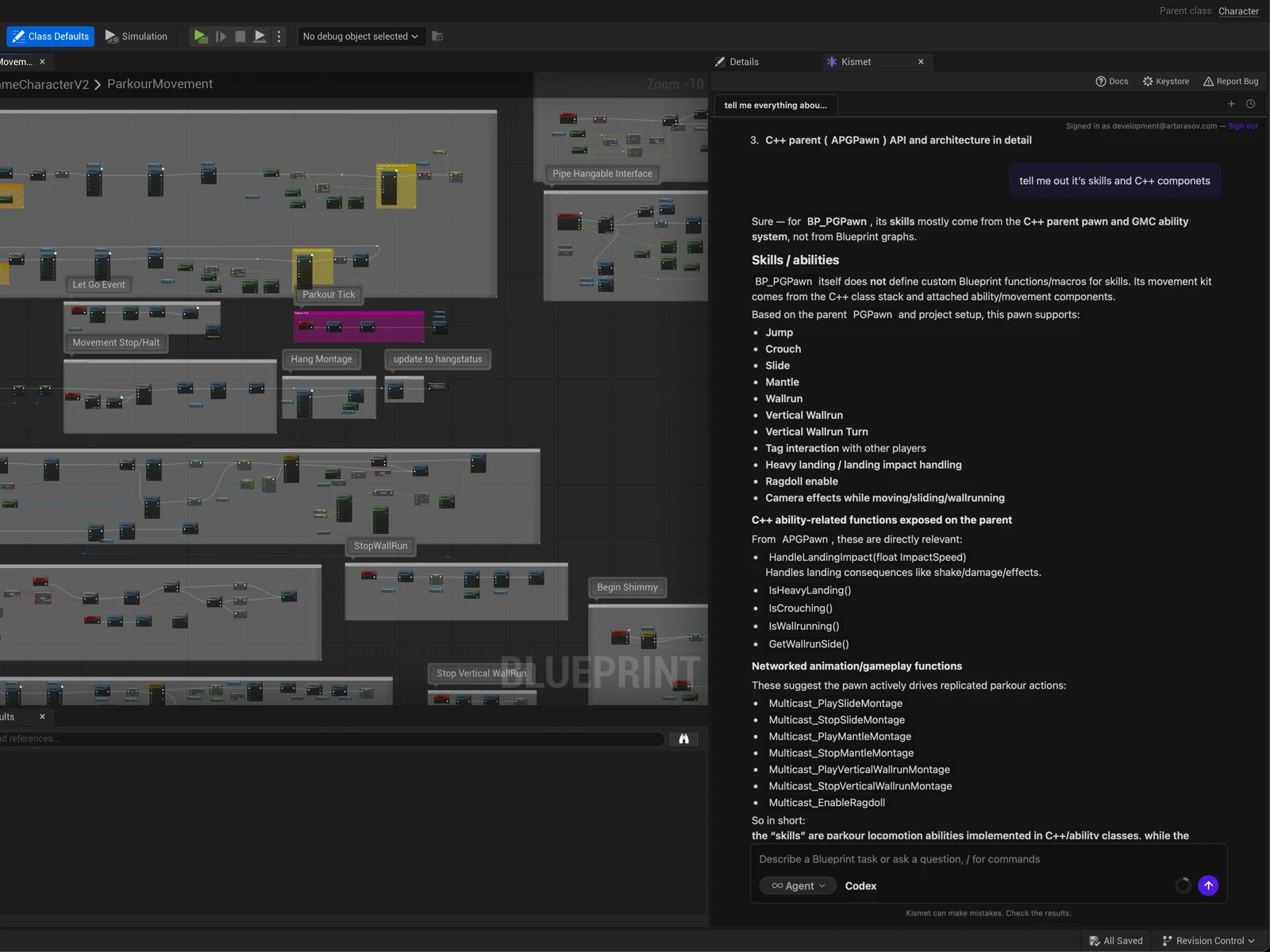
No second window. No context switch. The agent panel sits inside the Blueprint editor, with token usage, streaming responses, and run history in the same place you're working.
Other tools route you through a separate IDE or chat client. Kismet is the only one that ships as native UE5 editor integration.
Yours, openly
Your key stays yours.
Kismet calls the AI provider directly from your machine. Your API key never reaches Kismet's servers, and is never proxied or logged.
Conversation history is saved to your account so you can review past runs and so Kismet can improve. Your code and your key are not.
Who it's for
Built for people who ship.
Kismet is not a game generator. It assumes you know what you're building and makes the building faster — for Blueprint and C++ developers, technical designers, and studios on a deadline.
If you're looking for a tool that turns a prompt into a game, this isn't it. If you're looking for one that holds up in a five-year-old codebase, it is.
Beta access
Managed usage plans are coming soon.
Kismet is in beta while we harden the verified edit loop with real projects. For now, use your own model key. Managed usage and team plans will arrive after the beta access period.
For studios
Team plans with shared knowledge bases, billing, and SSO are in the works. Tell us about your studio and we'll reach out.
We'll only use your email to reach out about team plans. See our Privacy Policy.
Community
Build with us in Discord.
Share what you're shipping, request features, watch for what's landing next. Closest line to the team.
FAQ
Common questions.
Who is Kismet for?
Professional Unreal developers and studios. Kismet does the mechanical work — placing, wiring, refactoring, tracing — at production scale, and verifies it with the compiler. It is not a prompt-to-game generator.
What does Kismet do?
Kismet is an AI agent for Unreal Engine. It edits Blueprint graphs, Animation Blueprints and state machines, Materials, and UMG widgets. It reads your C++ — including plugins and engine source — and verifies every change with the compiler. It runs as a UE5 editor plugin.
Does my API key go through Kismet servers?
No. The plugin calls the AI provider directly from your machine. Your key is never proxied, stored, or logged on Kismet servers.
Why do I need an account?
So your conversation history persists across machines, and so device pairing works.
What UE versions are supported?
UE 5.6, 5.7, and 5.8. Older versions on request — write us if you have a project on an older engine.
What models does it use?
Frontier models from Anthropic, OpenAI, and Gemini — with your own API key. Bring one provider or mix them.
Why not just Claude Code or Codex with an Unreal MCP server?
An MCP server gives a general-purpose agent thin wrappers around editor calls. The model still has to guess Blueprint internals — pin types, anim pose spaces, material instance rules — and "success" means the call returned, not that the graph compiles. Kismet bakes that Unreal knowledge into the tools themselves, compiles every change before reporting it done, and is graded against an eval suite with code-level assertions before each release. And it runs inside the editor as a native plugin, not from a separate IDE.
Which platforms work?
Windows and macOS. The plugin builds and runs on both.
The verified
AI agent for
Unreal Engine.
- Beta access
- Managed usage plans coming soon
- UE 5.6, 5.7, and 5.8